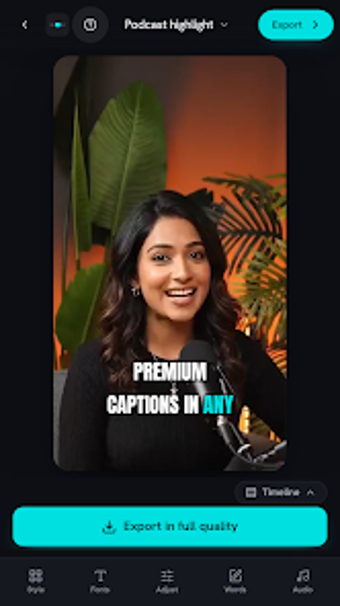
Fast AI captioning and sound polish for short-form creators
Auto-generate timed captions, matching emoji, and studio-clean audio from a single clip in seconds, producing social-ready short videos without manual timelines. ClipCaption, from Flashverse Technologies, targets short-form creators and marketers on platforms like TikTok and Instagram. Its core tools include word-by-word transcription, one-tap background-noise removal, and an AI script and hook generator, so you can go from raw footage to captioned, export-ready content quickly while keeping the workflow device-based or browser-accessible.
How the app handles the first-pass edit
You use the app to convert spoken audio into word-by-word timed captions automatically, which removes manual caption placement. The app pairs that transcription with an AI script and hook generator that drafts opening lines and calls to action from a short summary. This approach replaces timeline chores: instead of moving keyframes, the AI applies captions, emoji, and sound cues across the clip in an automated first pass.
What formats and platforms it supports
ClipCaption targets short-form outlets and exports content tailored for TikTok, Instagram Reels, YouTube Shorts, and LinkedIn Video, so your output matches those platforms' orientation and pacing. The Android app works alongside a browser-based version that requires no install, letting you edit on a device or on desktop. The transcription engine handles fast speech and varied accents, improving caption accuracy when audio input is clear.
Interface, workflow, and onboarding for creators
The app removes timeline mastery by giving you a single automated workflow: import a clip, let the AI caption and place sound effects, then pick from over 50 caption styles. Studio-clean audio tools perform background-noise removal and voice leveling with one tap, reducing the need for separate audio editors. The script generator and metadata features let you produce descriptions and hashtags without manual drafting.
Performance limits and production trade-offs
Automated editing speeds up turnaround but trades fine-grained control for convenience, because you don't work with keyframes or multi-track mixers. Advanced sound-design or precise timing adjustments require manual tweaking outside this workflow. The app offers on-device generation for some features to protect privacy, while the full AI suite typically needs a network connection for advanced processing.
A fast entry point for creators who prioritise speed over micromanagement
If you make short-form videos and need rapid captioning, scripting, and audio polish without learning timeline editors, this app provides a practical gateway into AI-assisted production. Expect quick, publishable clips and less hands-on control; creators who need detailed multi-track mixing or frame-level edits will outgrow the workflow, but casual and time-pressed creators get an efficient path from footage to shared video.